Which gaming mode will please my mice?
We use VR setups, see for instance this study, which require fast monitors. We recently got some cheap gaming monitors from MSI
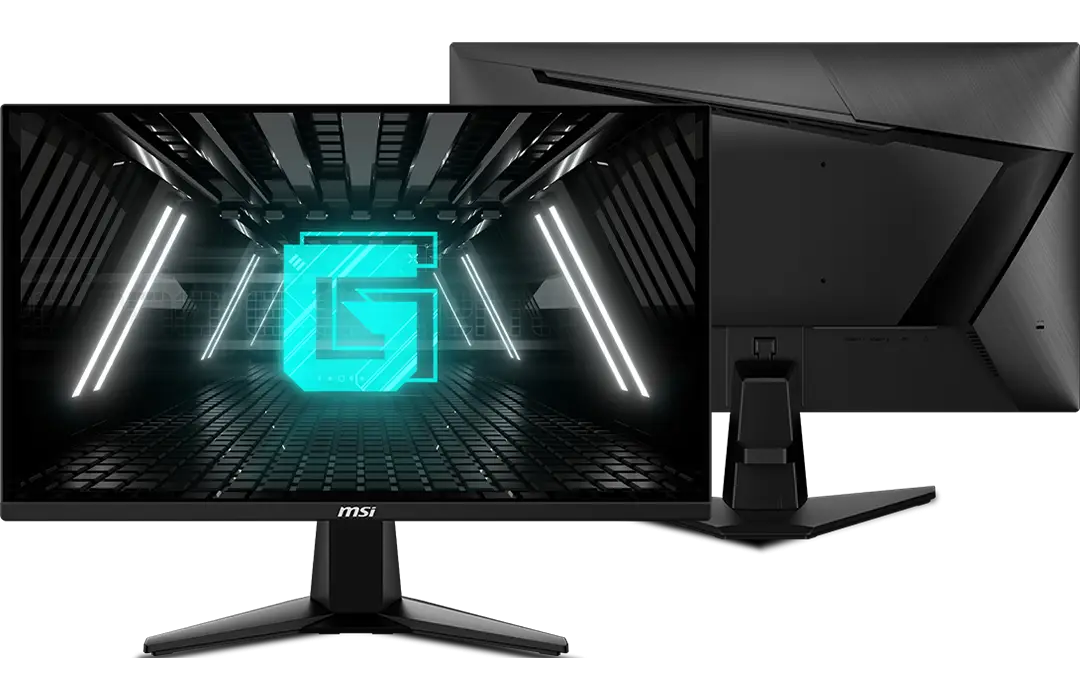
The screens have a 180 Hz refresh rate with 1 ms response time but it’s quite unclear for which of the many modes they offer this performance can be reached. The descriptions on the website and manual are not really informative. In particular, MSI monitors have 4 different gaming modes but apart from some high level description, I couldn’t find what they actually do in practice. It’s clear that they change a bunch of the exposed settings (brightness and co.) and the color balance but they seemed to do more than that. So I tried to fix every parameters I could access and change them one by one and looked at what happens. More precisely, I used a photodiode to measure how fast the screen reached a steady state when switching from white to black. I measured the response to a single step, to see how long it takes to reach steady state, and the response to alternating black and white frames, to see if the luminance is somewhat comparable to the steady state response.
Brightness and sharpness
First, I checked that brightness and sharpness do not affect the pixel response time. Obviously, with higher brightness, the luminance is higher, to focus on response time only, I normalised by the steady state value (defined as the 90% percentile of the photodiode signal amplitude when the screen is white).
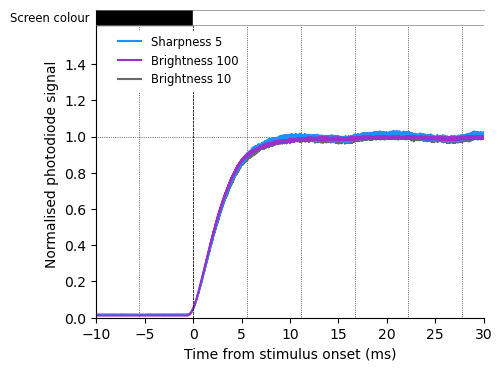
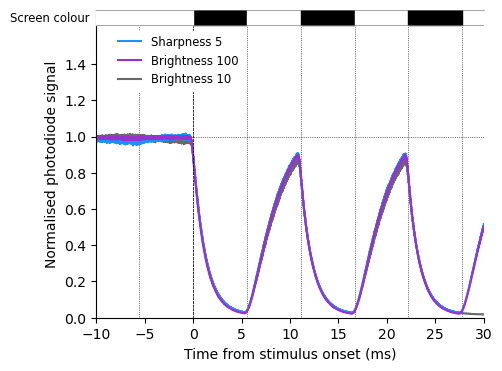
Surprinsingly the steady-state is not quite steady. Every other frame is marginally darker and the effect is more obvious at lower brightness. Unfortunately, we need quite low brigthness settings in our conditions, but the the variation looks acceptable. Apart from that, as expected, the rise time is unaffected by these settings.
Response time
“Pixel response time” is the MSI name for overdrive, or RTC (response time correction),
they have three options forresponse time, normal, fast, and fastest. A low response
time is likely to induce ghosting, where pixels take too long to flip color and leave a
track behind objects when they move fast. On the opposite, over-overdriving can
induce inverse ghosting, or coronas, if the pixel overshoot their final value before
settling down. For more description and some fun tests, see the blur buster webpage.
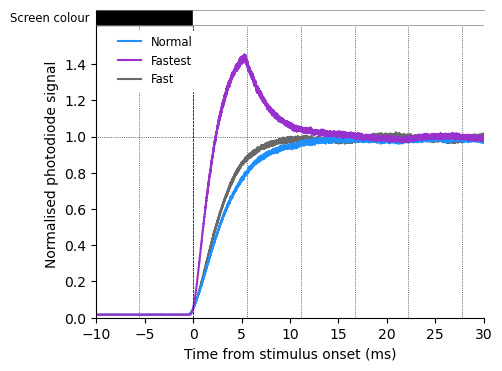
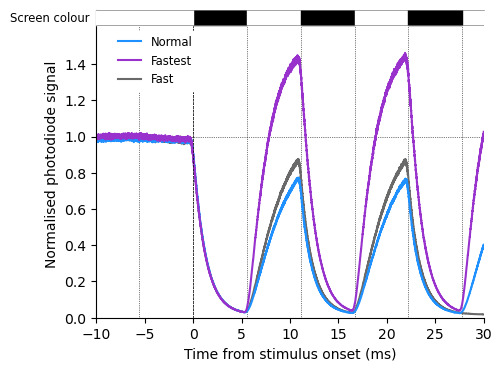
The normal setting takes a bit more than 2 frames to reach steady state, with fast the rise time is reduced to ~1.5 frames, not dramatic but still noticeable. The fastest mode has a large overshoot which make it quite useless.
So we go with fast.
MPRT; which is not actually MPRT
MPRT stands for Moving Picture Response Time and is a measurement standard of display persistence. The name that MSI, gives to the backlight strobing setting reducing MPRT is … MPRT, which is kinda confusing.
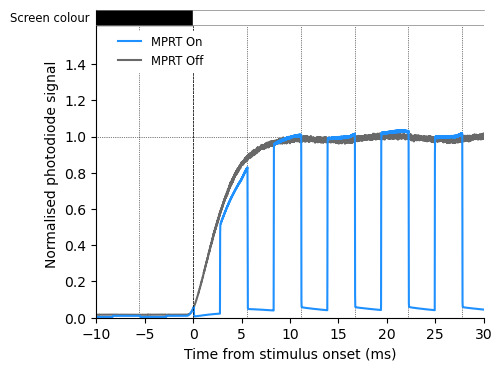
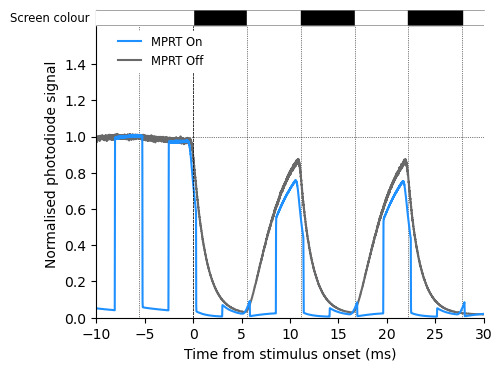
When MPRT is on, the brightness setting is unavailable and the only option is far too bright for our use case, so for now, we’ll forget about it.
Gaming mode
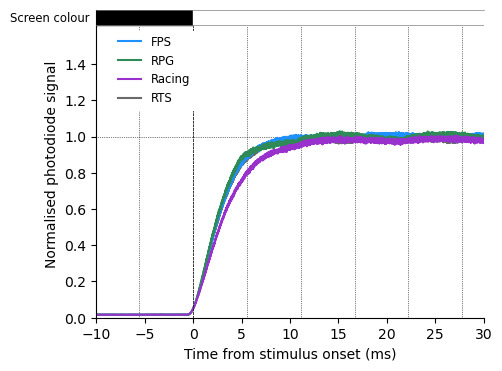
Finally, once all other settings are set, we can try the gaming mode and see if they do anything apart from changing the color balance (which won’t be obvious on this test with black and white images).
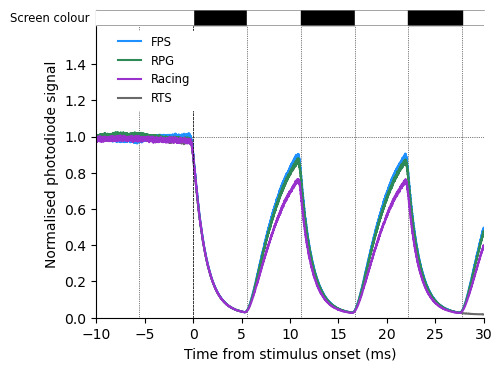
Conclusion
For now I’ll go with Brightness = 10, Sharpness = 0, Fast, MPRT Off, RTS, which
is the grey curve in all the figures.
I did not test if the gaming modes affect the closed loop response time or the frequency of frame drops. If I get the chance I might do that another time.